UNI Research Workbench Professional
A project-based statistical analysis tool intended to provide a streamlined research workflow and report generation. Developed by an academic and researcher to provide an integrated environment for data management
Developed by Dr. Robert T. Hitlan
About the Software
UNI Research Workbench Professional is a specialized statistical software program focused on supporting research in psychology and other social and behavioral sciences. It provides researchers and students with powerful analytical tools tailored to the methodological needs of social scientists.
The program was developed to address gaps in existing statistical tools and provide an integrative framework for data analysis and reporting. Program stengths include, research-oriented guidance, automated diagnostics, reproducible statistical output, and direct generation of formatted Word and PDF reports.
Key Features
Statistical Analysis
Comprehensive suite of statistical procedures optimized for psychological research data.
Data Visualization
Generate publication-ready charts and figures directly from your data sets.
Research Templates
Pre-built templates aligned with common research designs in social and organizational psychology.
Export Options
Export results in multiple formats compatible with APA publication standards.
See It in Action
The Research Workflow view guides you step-by-step from project setup through data import, screening, analysis, and APA-style reporting.
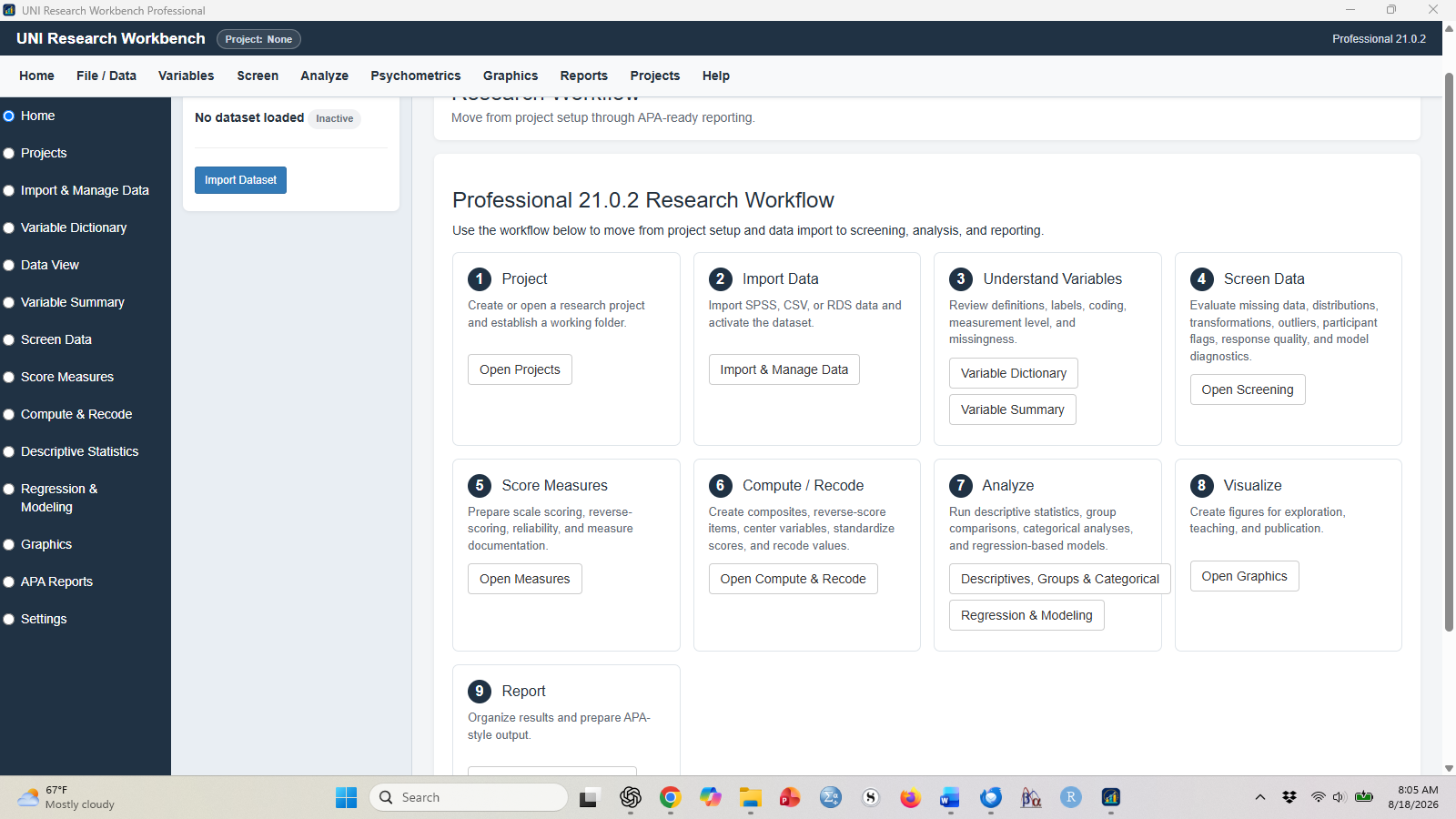
UNI Research Workbench Professional 21.0.2 — Research Workflow view
Download & Documentation
UNI Research Workbench Professional is free for academic and research use. Download the ZIP file, extract its contents, and run the appropriate installer for your setup.
Capabilities Handout
UNI Research Workbench Professional
Version 21.0.2 · Free for academic use
- Free for academic and research use
- Compatible with Windows and macOS
- No installation fee or license required
Questions? Contact [email protected]
Installation Instructions
1Download the ZIP File
Download the complete installation package from Dropbox. After downloading, extract the ZIP file contents to a folder on your computer before running any installer.
2Choose the Right Installer
The ZIP contains two Windows installers. Choose the one that matches your setup:
Existing R Setup
UNI_Research_Workbench_Professional_21.0.2_Existing_R_Setup.exeUse this if R 4.6.1 is already installed and all 140 required packages are present. If any packages are missing, the installer will fail validation — use the Complete Setup instead.
Complete Setup
UNI_Research_Workbench_Professional_21.0.2_Complete_Setup.exeUse this if R 4.6.1 is not installed or if you are unsure. Includes the private R environment and all required packages. Recommended for most first-time installations.
3Run the Installer
- 1.Download and extract the ZIP file.
- 2.Open the extracted folder.
- 3.Read README_FIRST_Installation_Instructions.txt.
- 4.Run the appropriate installer.
- 5.Follow the installation prompts.
- 6.After installation, launch UNI Research Workbench Professional from the desktop shortcut.
✓Optional File Verification
Checksum verification is optional and not required for installation. To verify the downloaded ZIP has not been altered, the SHA-256 checksum is:
2bca39e8193e05517878ebe6aad4a7b46ddbe6b22c14c8ab041783e21944029aA SHA256SUMS.txt file is also included in the ZIP for verification of the individual installers.
How to Cite
Hitlan, R. T. (2026). UNI Research Workbench Professional (Version 1.0) [Computer software]. University of Northern Iowa, Department of Psychological Sciences.